Overview
Modern bank reconciliation includes major changes to Reconciliation matching rules.
Mark new transaction rules have been replaced by new actions as described in more detail here .
Currently the standard Reconciliation matching rules data entity doesn’t support Modern bank reconciliation new actions.
Interim option for migration is to either manually create/change the Mark new transaction rules to the new actions, or use Electronic reporting to create these new Reconciliation matching rules.
The following sections will describe the Electronic reporting import option that includes Finance Utilities fields and intercompany offset support.
Note: After enabling the Modern bank reconciliation feature, running the standard Cash and bank management > Setup > Advanced bank reconciliation setup > Advanced bank reconciliation data upgrade will DELETE all remaining Mark new transaction reconciliation matching rules. It is thus important to ensure all required rules have been migrated before running this upgrade.
Note: The Electronic reporting import option is only provided as interim solution and clients would need to map any additional fields including financial dimensions.
Validation hasn’t been built into the import, please ensure the data is correct.
Tables and Configurations
Tables
Modern bank reconciliation rules are stored in the following tables:
- BankReconciliationMatchRule - Shared across legal entities
- BankReconciliationMatchRuleLine - Shared across legal entities
- BankReconciliationMatchRule_PostingInfo - Legal entity specific offset details
Electronic reporting configurations
Electronic reporting consists out of the following configurations:
- Bank reconciliation match rule model - related to BankReconciliationMatchRule table
- Bank reconciliation match rule line model - related to BankReconciliationMatchRuleLine table
- Bank reconciliation match rule posting Info model - related to BankReconciliationMatchRule_PostingInfo table
Fields per table / configuration
File 1 - Table : Bank Reconciliation match rule (BankReconciliationMatchRule)
- Rule Id
- Name
- IsActive
- MatchActionType
- Search Matching Entry
- Matching Type
- Require Manual Matching
File 2 - Table : Bank reconciliation match rule line (BankReconciliationMatchRuleLine)
Create a line for each line in the applicable step/s (i.e. could be multiple lines for the rule)
- Rule Id
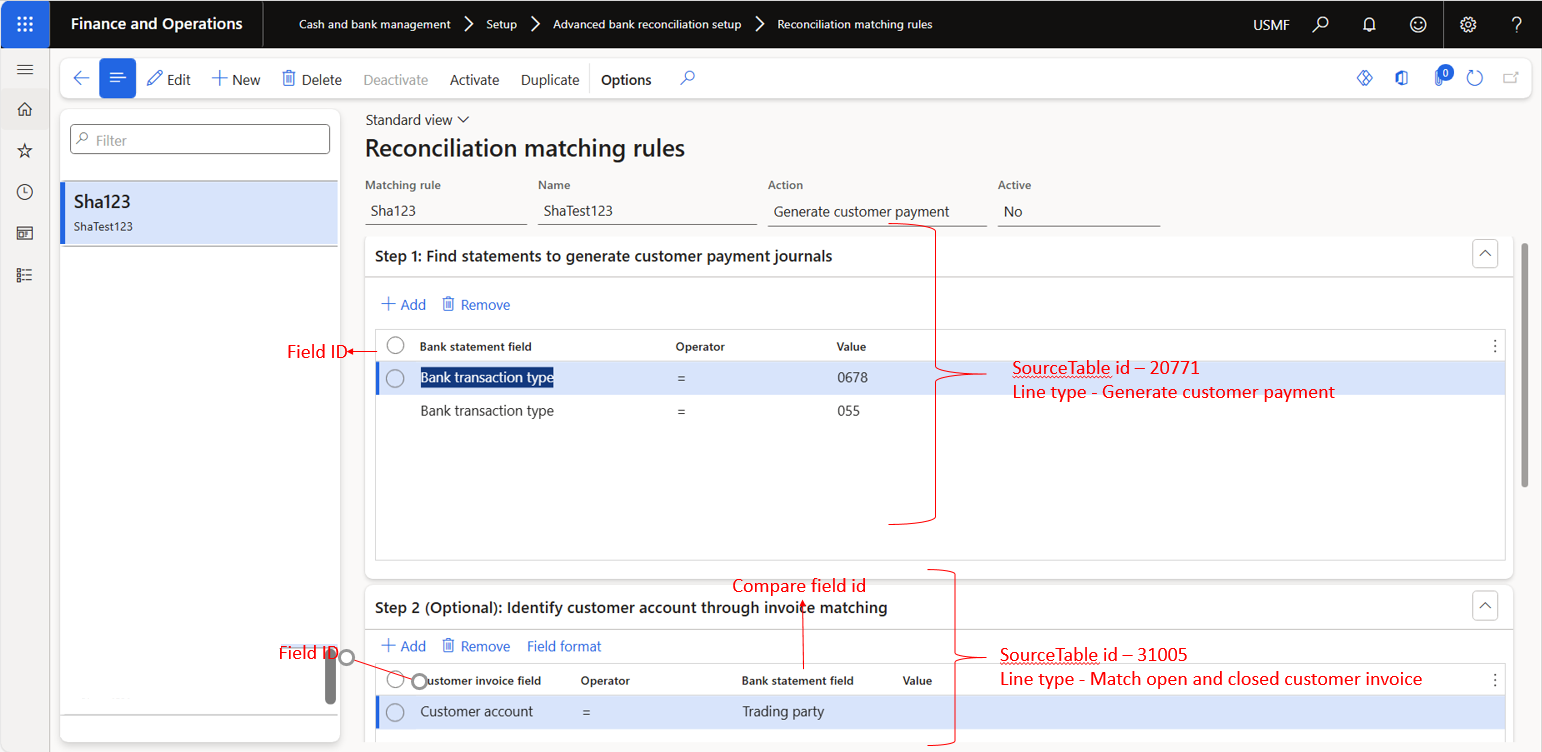
- Compare Field String
- Compare Field ID - see table systablefieldidview for specific Table id
- Field ID - see table systablefieldidview for specific Table id
- Line Num
- Line Type
- Operator
- Source Table ID - see table systableidview
- Value
- Offset Account Pattern
File 2 Field reference:
File 3 - Table : Bank reconciliation match rule posting Info (BankReconciliationMatchRule_PostingInfo)
- Rule ID
- Legal Entity
- Bank Transaction Type
- Transaction Text
- Offset Account Type
- Offset Company
- Offset Ledger Dimension
- Customer Account
- Vendor Account
- Automatic Customer Account Matching
- Account date type
- Method of payment
- Sales Tax Group
- Item Sales Tax Group
- Prepayment Journal Voucher
- Posting Profile
- Post
Reconcilition matching rule Actions
Generate voucher
Action Generate voucher is used for offsets to ledger and bank.
- File 1 - Bank Reconciliation match rule
- File 2 - Bank reconciliation match rule line (Step 1)
- File 3 - Bank reconciliation match rule posting Info (Step 2)
Generate vendor payment
Action Generate vendor payment is used for offsets to vendors.
- File 1 - Bank Reconciliation match rule
- File 2 - Bank reconciliation match rule line (Step 1)
- File 3 - Bank reconciliation match rule posting Info (Step 2)
Generate customer payment
Action Generate customer payment is used for offsets to customers.
- File 1 - Bank Reconciliation match rule
- File 2 - Bank reconciliation match rule line (Step 1 and 2)
- File 3 - Bank reconciliation match rule posting Info (Step 3)
Settle customer invoice
Action Settle customer invoice is used for offsets to customers.
- File 1 - Bank Reconciliation match rule
- File 2 - Bank reconciliation match rule line (Step 1 and 2)
- File 3 - Bank reconciliation match rule posting Info (Step 3)
Import
Import process
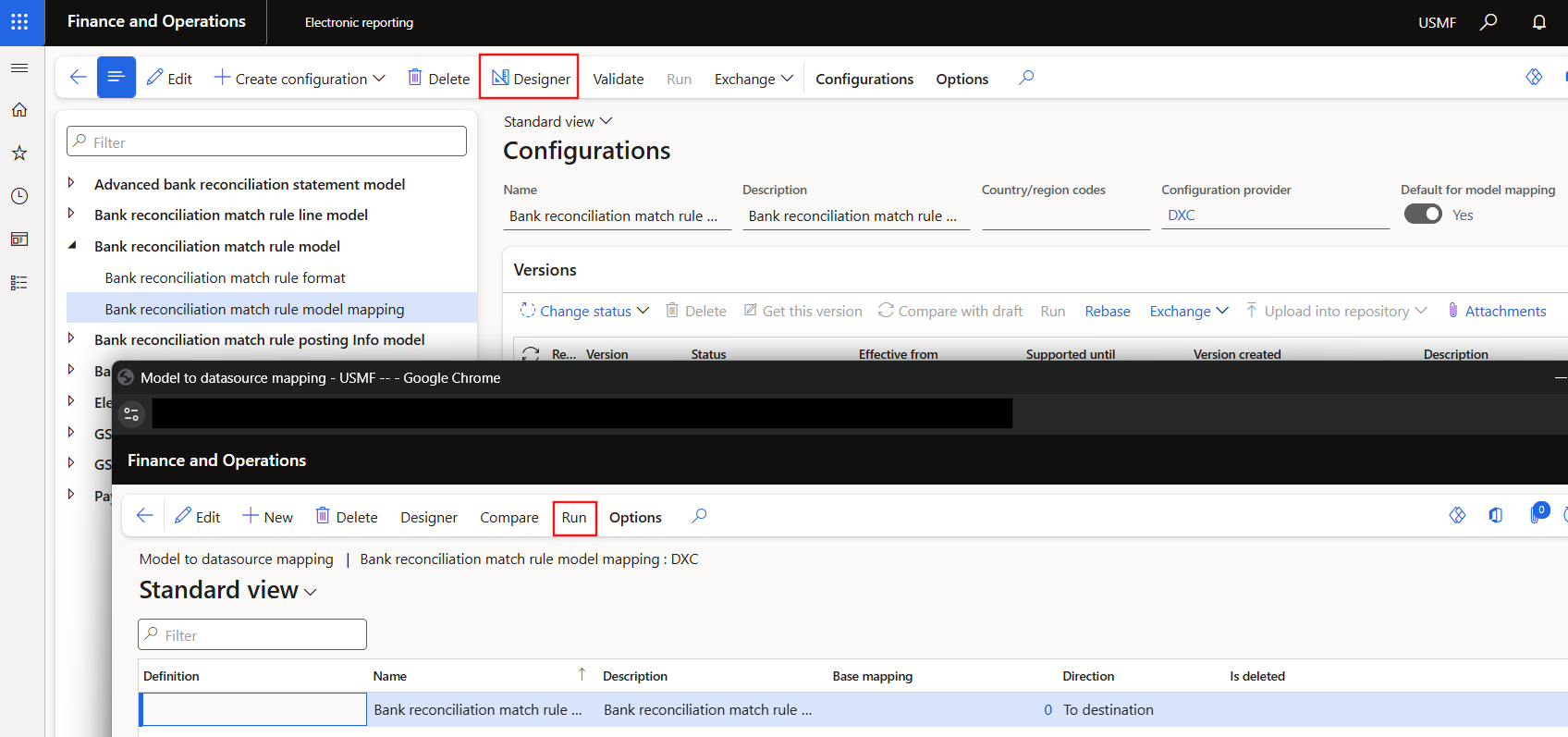
After creating the three csv files (without headers), the files can be imported via the Run option on the mapping configuration.
Examples
Example import files
Examples with table headings
Excel file with headings and examples for each action: Example file
