10.0.43.20250829
This document describes the features that are either new or changed in the release version 10.0.43.20250829.
Build 10.0.45.2025082965
Release date: 15 January 2026
Bug fixes
| Number |
Module |
Functionality |
Description |
| 24202 |
Cash and bank management |
Import bank statement |
Incorrect error when importing ER bank statement format and limiting it to one specific bank account. The messages incorrectly stated the operation was cancelled and error message. Bank statement still imported. Error message has now been updated. |
Build 10.0.43.202508295
Release date: 22 October 2025
Bug fixes
| Number |
Module |
Functionality |
Description |
| 24368 |
Accounts payable |
Vendor payment advice |
Removed the If statement from Vendor payment advice generation that only populated Finance utilities Vendor bank details in the BankPaymAdviceVendTmp table when it was a custom report. |
Build 10.0.43.202508294
Release date: 15 September 2025
New features
| Number |
Module |
Functionality |
Description |
| 23483 |
Cash and bank management |
Modern bank reconciliation |
Electronic reporting import option to create Modern bank Reconciliation matching rules.
Interim option for migrating ‘Mark new transactions’ Reconciliation matching rules (Std data entity doesn’t support Modern bank reconciliation)
User guide |
| 23102 |
Cash and bank management |
Import bank statement via Financial utilities connection |
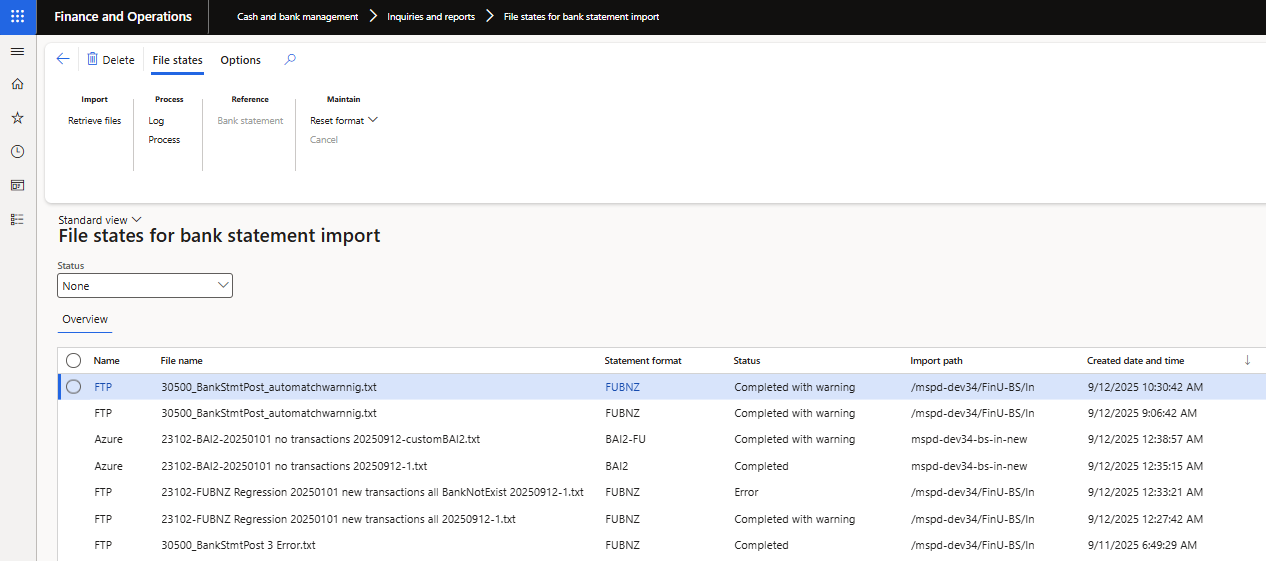
New form called File states for bank statement import to view and manage Bank statement files imported via periodic task Import bank statements via financial utilities connection.
Electronic reporting and Custom bank statement formats are supported.
It allows users to easily view logs and applicable files state for each file:
• Completed - Successfully created bank statement/s
• Completed with warning - Imports where the import batch job didn’t error but there was a warning. Examples:
- Existing confirmed bank statement for same date.
- No bank statements were created as the file contained no transactions.
• Error - Bank statement wasn’t created, for example ‘No matching bank account found’
• Cancelled - Option to cancel, which changes the status from Error to Cancelled.
 |
Bug fixes
| Number |
Module |
Functionality |
Description |
| 23808 |
Organisation administration |
ABN lookup |
Modifying ABN lookup to improve speed. |
| 24056 |
Cash and bank management |
Modern bank reconciliation |
‘Import bank statement’ button not available on form ‘Bank statement’ when Modern bank reconciliation feature is enabled and Finance Utilities feature is disabled. Only related to 10.0.43.202508293. |
Build 10.0.43.202508293
Release date: 29 August 2025
New features
| Number |
Module |
Functionality |
Description |
| 17513 |
Cash and bank management |
Modern bank reconciliation |
Support for feature Modern bank reconciliation.
Setup
Processing
Excluded:
• Reconciliation matching rules Data entity, as the std entity doesn’t support Modern bank reconciliation yet - dependent on MS.
• 10.0.45 feature Automatic vendor account matching |
| 21820 |
Accounts payable |
BPAY - Biller code |
Similar to how Finance Utilities ‘Lodgement reference’ works, ability to:
• Method of payment: Set Payment control and Payment attributes for Biller code.
• Ability to override the defaulted Biller code on Invoices. |
| 20204 |
Various |
ABN validation |
Where using the ‘Search by ABN’ in ABN lookup and fullName isn’t available in the legalName section, a concat of givenName, otherGivenNames and familyName will be provided in the Company name in the Search result instead if blank. |
| 23214 |
Organisation administration |
ABN validation |
Rename report ‘Organisation administration > Enquiries and reports > ABN Validation’ to ‘Organisation administration > Enquiries and reports > ABN validation report’ |
| 22984 |
Accounts payable |
Sundry |
One vendor account can used for multiple sundry vendors when using a Method of payment where ‘Sundry method of payment’ = Yes.
Accounts payable parameter Check the invoice number used will now use the combination of the following to determine uniqueness of sundry invoices:
• Invoice
• Sundry BSB\routing number
• Sundry bank account
For example where two invoices with same id are processed for the one Sundry vendor account, but the sundry bank details differ between the two invoices, they will not be seen as duplicates. |
| 23156 |
Budgeting |
Security configuration |
Created new role Budget import manager using duty ‘Maintain budget import. Related to 22784. |
| 22980 |
Various |
DXC Connections - SFTP |
DXC Connections 10.0.43.202508012. Upgrade SFTP library to latest 2025.0.0 Release notes |
| 19182 |
Product Experience Metrics |
Product support |
New model ‘DXC Product Experience Metrics’ - version 10.0.43.202508293. Product Experience Metrics is a foundational model that defines the structural and semantic framework for product support. It provides interfaces and dependencies that serves as a shared reference layer for all products. |
Bug fixes
| Number |
Module |
Functionality |
Description |
| 22938 |
Organisation administration |
Electronic reporting export connection |
Missing security configuration on ‘Electronic reporting export connection’. |
| 23048 |
Cash and bank management |
Mark as reconciled in batch |
Where the bank statements were set to automatically post and the user selected ‘Mark as reconciled in batch’ (instead of ‘Mark as reconciled’), the bank statement wasn’t automatically posted. |
| 23078 |
Cash and bank management |
Financial dimensions on mark new transactions |
Issue in Financial dimensions for mark new transactions for currently legal entity offsets. The offset’s financial dimension was also used on the bank account posting. |
| 23211 |
Various |
ABN validation |
Reviewed GST registered = C ABN records, incorrectly changed to Reviewed = No, after running update with no changes to the record. |
