Technical guide - Web API
Two service endpoints are exposed as part of the EDI solution.
Service group name: SAB_EDIServices
- SAB_EDIInboundService
- Allows import of files accessible via a temporary blog storage URL
- Allows single file import
- Allows multiple file import
- Allows package import (zipped file)
- Any third-party service that can process Http based client requests can be utilized
- SAB_EDIOutboundService
- Allows access to export file via a temporary blog storage URL
- Allows access to export package via a temporary blog storage URL
- Any third-party web-based service that can be authenticated using an application Id and secret can be used to configure the Web API settings for access to export files.
For more details see, custom services Microsoft documentation:
https://learn.microsoft.com/en-us/dynamics365/fin-ops-core/dev-itpro/data-entities/services-home-page
https://learn.microsoft.com/en-us/dynamics365/fin-ops-core/dev-itpro/data-entities/custom-services
Connection setup
The connection setup for web services need to be specified here: EDI > Setup > Connection setup > Web API settings
See guide for more details.
Inbound services
The EDI module exposes various functions to send files into the inbound staging area for processing.
For each integration, the SAB_EDIExternalWebServiceIncoming class needs to be implemented to specify the logic for where the file can be downloaded from or for any specific requirements and mappings needed for the document type processing.
This requires the web api settings for connection details.
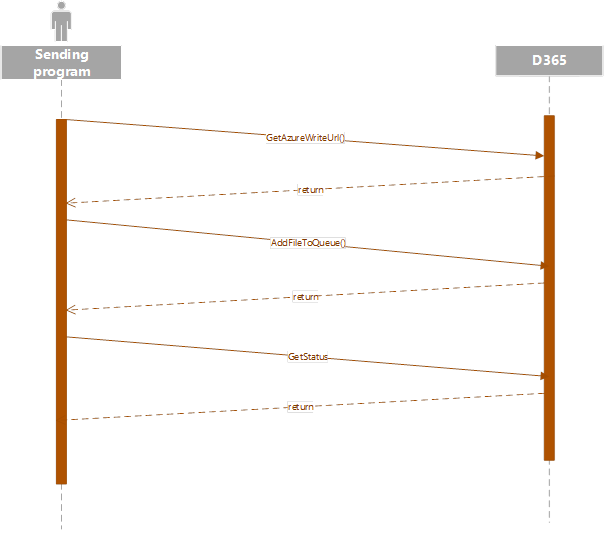
GetAzureWriteUrl
GET /api/Services/SAB_EDIServices/SAB_EDIInboundService/GetAzureWriteUrl
Retrieves a writable Azure URL to upload a file for reading into D365.
This requires an input parameter for the name of the file. This can be any file type that is supported and configured for EDI document types.
This request will return a single URL end point.
This endpoint utilizes the same underlying framework as data management to generate a temporary blob storage URL.
Example: https://xx.blob.core.windows.net/dmf/text.xml?sv=2014-02-14&sr=b&sig=OoMCuQnQqOVgM5gpw8HNqeuGlApBSta3IPCU99uOnYI%3D&st=2023-07-04T06%3A26%3A04Z&se=2023-07-04T07%3A01%3A04Z&sp=rw
Request
| Name |
Type |
Description |
| uniqueFileName |
String |
Required The name of the file |
Sample:
application/json, text/json
{
”uniqueFileName”: “exampleFile.xml”
}
Response
| Name |
Type |
Description |
| AzureWriteId |
GUID |
A unique identifier |
| AzureWriteUrl |
String |
An Azure writable URL |
Sample:
application/json, text/json
{
”AzureWriteId”: “8e59a2ba-ca6f-4d14-bafa-28e49c6528c9”,
”AzureWriteUrl”: “https://XXXX.blob.core.windows.net/dmf/exampleFile”
}
AddFileToQueue
GET /api/Services/SAB_EDIServices/SAB_EDIInboundService/AddFileToQueue
A request to this endpoint allows import of single files. This uses the same functionality to process the import as the Inbound files in EDI.
Parameters to add a single file into the inbound file queue
Request
| Name |
Type |
Description |
| AddFileToQueueContract |
|
|
| AzureWriteUrl |
String |
Required The azure blob storage URL of the file. File for the import.
A request to the GetAzureWriteUrl can be made to get access to the temporary blob storage URL.
This can be populated with the data required using any third-party web API that supports URL based file reading and writing and processing URL based request. |
| DocumentType |
String |
Required The EDI Document type the file relates to.
This determines the document type for import within EDI. The name should correspond against the document type name configured in EDI.
For example, Customer purchase order |
| TradingPartnerCompanyId |
String |
Required The legal entity the file relates to. The company in which file must be imported. This should be based on the configuration in EDI trading partners. |
| TradingPartnerId |
String |
Required Trading partner Id as configured in EDI trading partners |
| TradingPartnerType |
String |
Required The trading partner type as configured in EDI trading partners, for example, Customer |
| FileName |
String |
Required The name of the file for import |
Sample:
application/json, text/json
{
”AddFileToQueueContract”:{
”AzureWriteUrl”: “https://XXXX.blob.core.windows.net/dmf/exampleFile”,
”DocumentType”: “Customer purchase order”,
”FileName”: “ExampleFile001.xml”,
”TradingPartnerCompanyId”: “USMF”,
”TradingPartnerId”: “GLN00001”,
”TradingPartnerType”: “Customer”
}
}
This endpoint returns the status of import, error message (if any), name of file and the reference number for the import.
Response
| Name |
Type |
Description |
| Reference |
Long |
Unique identifier of the added file |
| ErrorMsg |
String |
Any error message generated |
| Success |
Boolean |
Whether the add was successful |
| FileName |
String |
Filename |
Sample:
application/json, text/json
{
”Reference”: “65468431638”,
”ErrorMsg”: “”,
”Success”: true,
”FileName”: “ExampleFile001.xml”
}
GetStatus
GET /api/Services/SAB_EDIServices/SAB_EDIInboundService/GetStatus
A request to endpoint requires the reference number received from the import endpoint to get the status of the inbound file.
A function to retrieve the status of a queued inbound file. It also has the ability to provide information on the processed document’s status if the inbound file has been processed.
Request
| Name |
Type |
Description |
| reference |
Long |
Required Unique identifier of the file |
| includeStagingStatus |
Boolean |
Required also return the status of the staging record if processed |
Sample:
application/json, text/json
{
”reference”: “65468431638”,
”includeStagingStatus”: true
}
Response
| Name |
Type |
Description |
| Status |
String |
The status of the file |
| ProcessedDateTime |
UTC Date time |
The date time the file was processed |
| ProcessedDocumentId |
String |
The processed file’s EDI Id |
| processedDocumentStatus |
String |
The processed files status |
Sample:
application/json, text/json
{
”Status”: “Processed”,
”ProcessedDateTime”: “1900-01-01T00:00:00Z”,
”ProcessedDocumentId”: “”,
”processedDocumentStatus”: “Not started”
}
AddFilesToQueue
GET /api/Services/SAB_EDIServices/SAB_EDIInboundService/AddFilesToQueue
A request to this endpoint allows import of a list of files.
This uses the same functionality to process the import file as the Inbound files in EDI.
The following parameters are required to be passed within a List by this endpoint.
Request
| Name |
Type |
Description |
| AddFileToQueueContracts |
|
|
| AzureWriteUrl |
String |
Required The azure blob storage URL of the file. This is the file for import.
A request to the GetAzureWriteUrl can be made to get access to the temporary blob storage URL.
This can be populated with the data required using any third-party web API that supports URL based file reading and writing and processing URL based request. |
| DocumentType |
String |
Required The EDI Document type the file relates to.
This determines the document type for import within EDI. The name should correspond against the document type name configured in EDI. For example, Customer purchase order |
| TradingPartnerCompanyId |
String |
Required The legal entity the file relates to. The company in which file must be imported. This should be based on the configuration in EDI trading partners. |
| TradingPartnerId |
String |
Required Trading partner Id as configured in EDI trading partners |
| TradingPartnerType |
String |
Required The trading partner type as configured in EDI trading partners, for example, Customer |
| FileName |
String |
Required The name of the file for import |
Sample:
application/json, text/json
{
”AddFileToQueueContracts”: [{
”AzureWriteUrl”: “https://XXXX.blob.core.windows.net/dmf/exampleFile”,
”DocumentType”: “Customer purchase order”,
”FileName”: “ExampleFile001.xml”,
”TradingPartnerCompanyId”: “USMF”,
”TradingPartnerId”: “GLN00001”,
”TradingPartnerType”: “Customer”
},
{
”AzureWriteUrl”: “https://XXXX.blob.core.windows.net/dmf/exampleFile02”,
”DocumentType”: “Customer purchase order”,
”FileName”: “ExampleFile002.xml”,
”TradingPartnerCompanyId”: “USMF”,
”TradingPartnerId”: “GLN00001”,
”TradingPartnerType”: “Customer”
}
]
}
Response
| Name |
Type |
Description |
| Reference |
Long |
Unique identifier of the added file |
| ErrorMsg |
String |
Any error message generated |
| Success |
Boolean |
Whether the add was successful |
| FileName |
String |
Filename |
Sample:
application/json, text/json
[
{
”Reference”: 6546813513,
”ErrorMsg”: “”,
”Success”: true,
”FileName”: “ExampleFile001.xml”
},
{
”Reference”: 6413813168,
”ErrorMsg”: “”,
”Success”: true,
”FileName”: “ExampleFile002.xml”
}
]
AddFileToQueue_package
GET /api/Services/SAB_EDIServices/SAB_EDIInboundService/AddFileToQueue_package
A function to push a data package which will be extracted and its contents put into the inbound file queue.
This endpoint allows import of files as a data package (zip file). This needs to have a XML manifest file (manifest.xml).
Supports multiple documents in single manifest file.
Example package
Data package
The data package is a zip file that includes a ‘manifest.xml’ xml file. The manifest file defines the files within the data package in the following XML structure
<Documents>
<Document>
<DocumentType/>
<FileName/>
<TradingPartnerCompanyId/>
<TradingPartnerId/>
<TradingPartnerType/>
</Document>
</Documents>
The following parameters are required to be passed for this endpoint.
| Name |
Type |
Description |
| DocumentType |
String |
Required The EDI Document type the file relates to.
This determines the document type for import within EDI. The name should correspond against the document type name configured in EDI.
For example, Customer purchase order |
| TradingPartnerCompanyId |
String |
Required The legal entity the file relates to. The company in which file must be imported. This should be based on the configuration in EDI trading partners. |
| TradingPartnerId |
String |
Required Trading partner Id as configured in EDI trading partners |
| TradingPartnerType |
String |
Required The trading partner type as configured in EDI trading partners, for example, Customer |
| FileName |
String |
Required The name of the file for import |
Sample:
<?xml version=”1.0” encoding=”utf-8”?>
<Documents>
<Document>
<DocumentType>PO</DocumentType>
<FileName>FileUpload_01.xml</FileName>
<TradingPartnerCompanyId>USMF</TradingPartnerCompanyId>
<TradingPartnerId>GLN00001</TradingPartnerId>
<TradingPartnerType>Customer</TradingPartnerType>
</Document>
<Document>
<DocumentType>PO</DocumentType>
<FileName>FileUpload_02.xml</FileName>
<TradingPartnerCompanyId>USMF</TradingPartnerCompanyId>
<TradingPartnerId>GLN00001</TradingPartnerId>
<TradingPartnerType>Customer</TradingPartnerType>
</Document>
</Documents>
Request
| Name |
Type |
Description |
| azureWriteUrl |
String |
Required The azure blob storage URL of the data package |
Sample:
application/json, text/json
{
” azureWriteUrl “: “https://XXXX.blob.core.windows.net/dmf/exampleDataPackage”
}
GetStatus
GET /api/Services/SAB_EDIServices/SAB_EDIInboundService/GetStatus
A request to endpoint requires the reference number received from the import endpoint to get the status of the inbound file.
A function to retrieve the status of a queued inbound file. It also has the ability to provide information on the processed document’s status if the inbound file has been processed.
Request
| Name |
Type |
Description |
| reference |
Long |
Required Unique identifier of the file |
| includeStagingStatus |
Boolean |
Required also return the status of the staging record if processed |
Sample:
application/json, text/json
{
”reference”: “65468431638”,
”includeStagingStatus”: true
}
Response
A collection of results
| Name |
Type |
Description |
| Reference |
Long |
Unique identifier of the added file |
| ErrorMsg |
String |
Any error message generated |
| Success |
Boolean |
Whether the add was successful |
| FileName |
String |
Filename |
Sample:
application/json, text/json
[
{
”Reference”: 6546813513,
”ErrorMsg”: “”,
”Success”: true,
”FileName”: “ExampleFile001.xml”
},
{
”Reference”: 6413813168,
”ErrorMsg”: “”,
”Success”: true,
”FileName”: “ExampleFile002.xml”
}
]
Outbound services
The EDI module exposes various functions to pull files from the outbound staging area for download.
An oData feed of the outbound file queue (/data/SAB_EDIFileExport) is available for discovering the outbound queued file references.
The outbound file can be configured using web API settings for an external storage.
Similar to Inbound, the SAB_ExternalWebServiceOutgoing class needs to be implemented to process the export file for each integration.
This requires the web api settings for connection details.
GetFileDetailFromQueue
This endpoint provides a URL endpoint with which the export file can be accessed using a reference number for the export.
Response – URL endpoint for export file, example file.xml
Request
| Name |
Type |
Description |
| reference |
Long |
Required The reference of the queued file |
Sample:
application/json, text/json
{
”reference”: 61684163581
}
Response
| Name |
Type |
Description |
| FileName |
String |
The filename |
| Reference |
Long |
The reference of the file |
| AzureUrl |
String |
The URL of the file for download |
Sample:
application/json, text/json
{
”FileName”: “packageDownload.zip”,
”Reference”: 61684163581,
”AzureUrl”: “https://icondev803825a2135bfabe1.blob.core.windows.net/edi/exampleFile001.zip”
}
GetFileDetailFromQueue_Package
This endpoint provides a URL endpoint with which the data package can be accessed using a reference number for the export.
Response – URL endpoint for zipped file, example, file.zip
Request
| Name |
Type |
Description |
| packageFileName |
String |
Required The name of the package to be created |
| References |
Collection of longs |
Required The reference of the queued file |
Sample:
application/json, text/json
{
”packageFileName” : “packageDownload.zip”,
”references”: [5637149076, 5637149076]
}
Response
| Name |
Type |
Description |
| FileName |
String |
The filename |
| AzureUrl |
String |
The URL of the file for download |
Sample:
application/json, text/json
{
”FileName”: “packageDownload.zip”,
”AzureUrl”: “https://icondev803825a2135bfabe1.blob.core.windows.net/edi/exampleFile001.zip”
}
Data package
The data package is a zip file that includes a ‘manifest.xml’ xml file. The manifest file defines the files within the data package in the following XML structure
<Documents>
<Document>
<DocumentType/>
<FileName/>
<TradingPartnerCompanyId/>
<TradingPartnerId/>
<TradingPartnerType/>
</Document>
</Documents>
| Name |
Type |
Description |
| DocumentType |
String |
Required The EDI Document type the file relates to |
| TradingPartnerCompanyId |
String |
Required The legal entity the file relates to |
| TradingPartnerId |
String |
Required The trading partner GLN the file relates to |
| TradingPartnerType |
String |
Required The Trading partner type the file relates to |
| FileName |
String |
Required The name of the file |
Sample:
<?xml version=”1.0” encoding=”utf-8”?>
<Documents>
<Document>
<DocumentType>PO</DocumentType>
<FileName>FileUpload_01.xml</FileName>
<TradingPartnerCompanyId>USMF</TradingPartnerCompanyId>
<TradingPartnerId>GLN00001</TradingPartnerId>
<TradingPartnerType>Customer</TradingPartnerType>
</Document>
<Document>
<DocumentType>PO</DocumentType>
<FileName>FileUpload_02.xml</FileName>
<TradingPartnerCompanyId>USMF</TradingPartnerCompanyId>
<TradingPartnerId>GLN00001</TradingPartnerId>
<TradingPartnerType>Customer</TradingPartnerType>
</Document>
</Documents>
