10.0.22.20220410
This document describes the features that are either new or changed in the release version 10.0.22.20220410.
Release 10.0.22.20220410
Build 10.0.22.2022041012
Excludes Inbound Transportation management (ITM) & ITM version Freight forwarder
Manual actions required
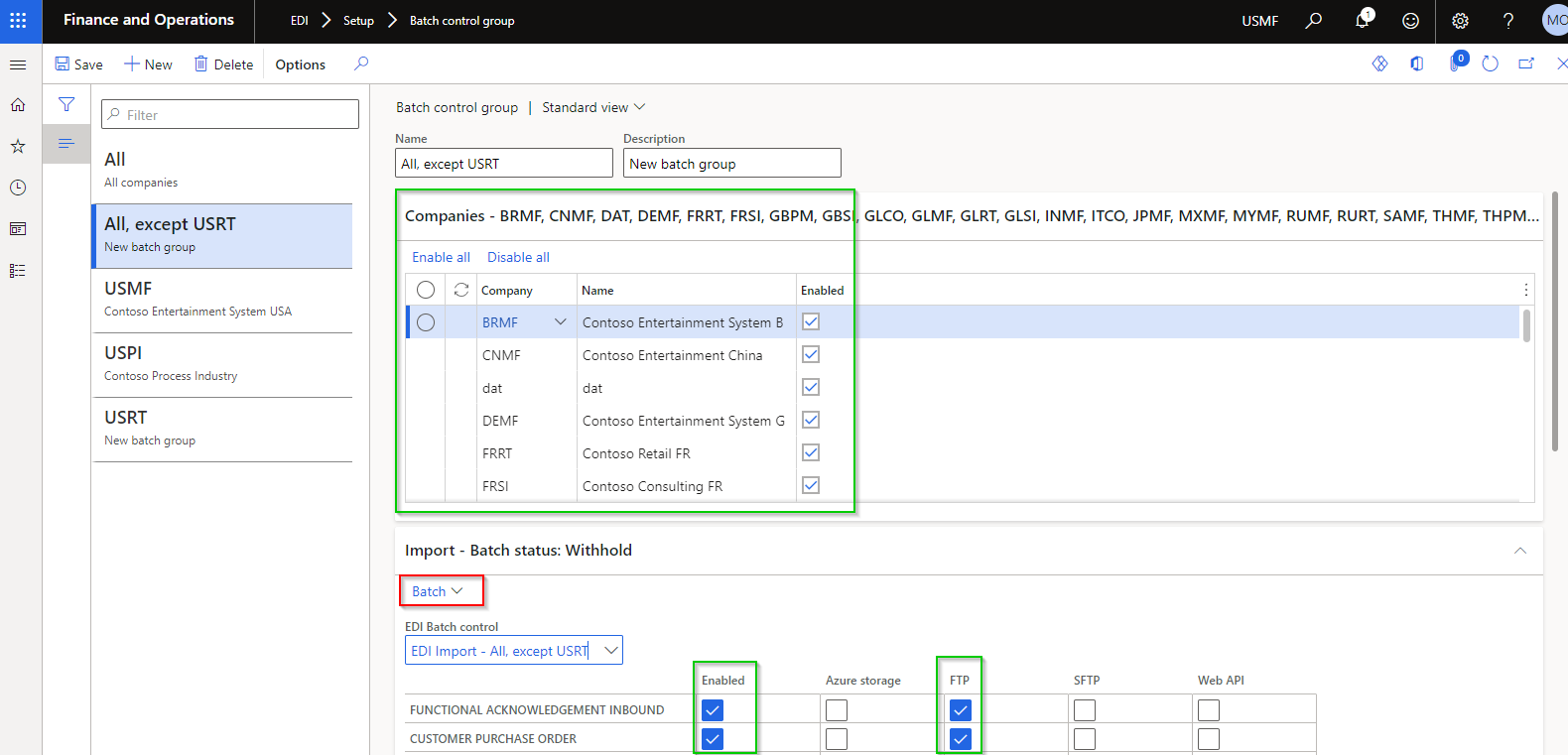
EDI > Setup > Batch control has been replaced with EDI > Setup > Batch control group.
Running Refresh module will transfer the “tick’s” (green in screenshot) from deprecated Batch control to new Batch control groups.
Next step is to delete the company specific EDI Batch jobs (via System administration > Inquiries > Batch jobs) and then create new batch jobs for each process via red in below screenshot. These will automatically be created on Company account dat, which enables the batch to run for multiple company accounts.
Deprecated
| Functionality |
Reason |
EDI > Setup > Batch control
EDI > Batch control (workspace) |
Replaced with EDI > Setup > EDI batch control groups, which allows companies to setup a batch for one or multiple legal entities.
See manual actions required. |
New features
| Number |
Functionality |
Reason |
| 9314 |
Batch control groups |
Allows companies to setup a batch group for one or multiple legal entities.
Note: See note in Deprecated section. |
| 9733 |
Fixed text file template |
Alignment and Padding character have been added to Fixed Text Document Type Templates.
Note: new index has been added to Field position for Text fixed templates, which doesn’t allow multiple fields to start in same position. Before upgrading, update template/s if Field position isn’t unique. |
| 9732 |
Text file template |
Text Document type’s Setup: Decimal separator ‘None’ option. |
| 9653 |
XML and JSON document template mapping |
Static values and Custom format on inbound XML and JSON document mapping. Examples:
• Where a field is in the inbound file, but should be replaced with another value: Use Custom format and substring formula. Example:

• Where a field isn’t in the inbound file, but a static value should be populated in staging: Use Static value. Example:
 |
| 10073 |
UOM mapping |
UOM mapping enhanced to include:
• Company (Blank Company is allowed where Item code is set to All)
• Item code (Table, Group, All)
• Item relation
• Inventory dimensions
Note: All existing UOM mappings will have Company set to Blank and Item code set to All. Should be no issues with backwards compatibility. |
| 9660 |
EDI batches |
Enable automated retries - if D365 experience a brief loss of connection to MS SQL Server. isRetryable set to True |
| 9792 |
Process to outbound |
Added Records to include filter on Process to outbound |
| 9742 |
Sales invoice |
Additional sales invoice fields:
• Header:
o Invoice contact name
o Invoice phone number
• Lines:
o Customer account
o Customer contact name
o Customer phone number
o Delivery address details from sales order line
o Backorder quantity
o Sales unit price (unit price before discounts excluding tax)
o Sales unit price include tax (unit price before discounts including tax)
o Unit discount
o Unit discount percent |
| 9612 |
EDI Document maintenance workspace |
New Tile File export errors added to EDI Document maintenance workspace (per module).
Displays Outbound files with Status is set to Error per module |
| 9714 |
Outbound filename |
Enhancements to form layout.
And additional currentSessionDate placeholders. |
| 9692 |
Purchase order confirmations |
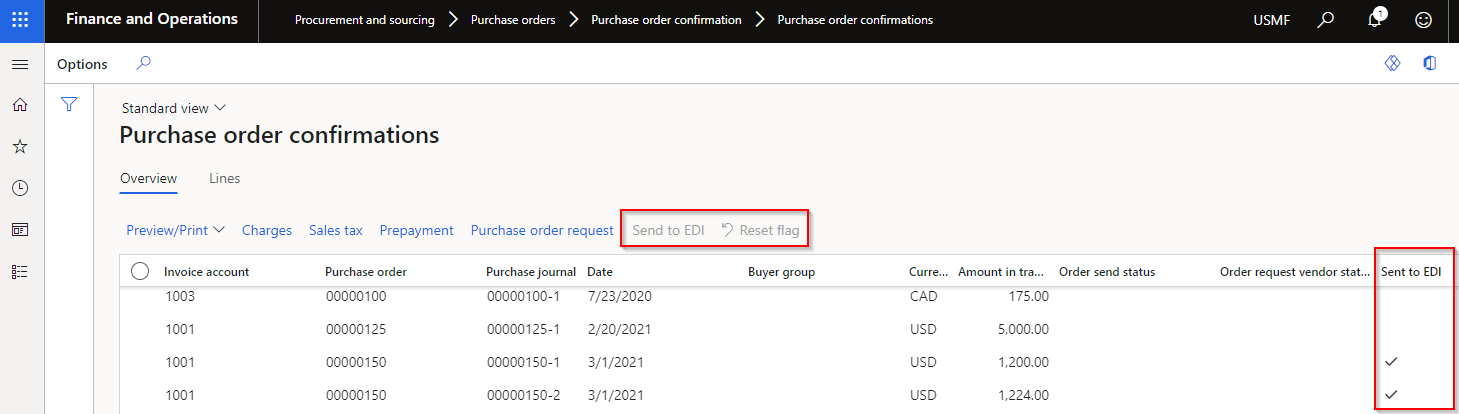
Procurement and sourcing > Purchase orders > Purchase order confirmation > Purchase order confirmations
Added Sent to EDI to list page, and buttons Send to EDI and Reset flag.
 |
| 10084 |
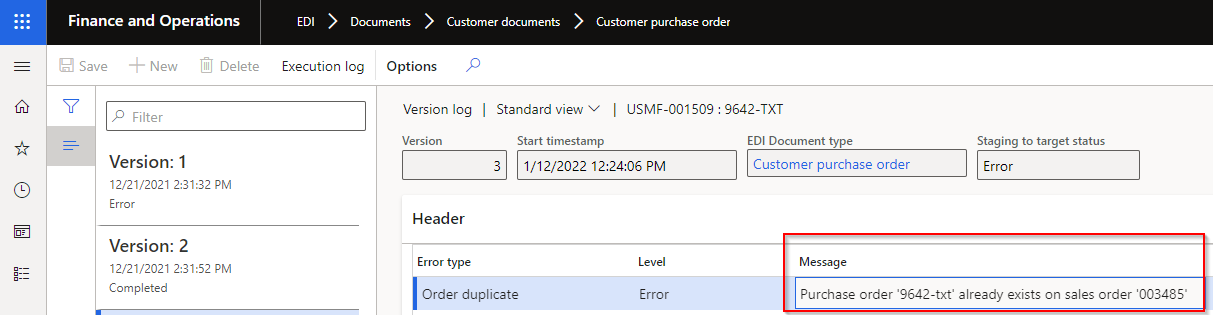
Version log’s Message |
Changed Message to unlimited type string
 |
| 10026 |
Stock transfer receipt – Purchase order |
New button Product receipt added to staging form. Enabled if the document setting Auto post receipt is set to Yes. |
| 9496 |
Staging line height |
New EDI extended data types to improve staging forms lines’ height. |
| 10147 |
Consignment notes |
Removed error message No document setting specified where a customer doesn’t have a setting profile assigned to Customer advanced shipping notice document. Add button will be disabled if no setting profile assigned. Add button is only enabled where document setting ASN strategy is set to Consolidated packing slip and Sent to EDI is No. |
9827
9829 |
Sent to EDI on EDI processing workspaces |
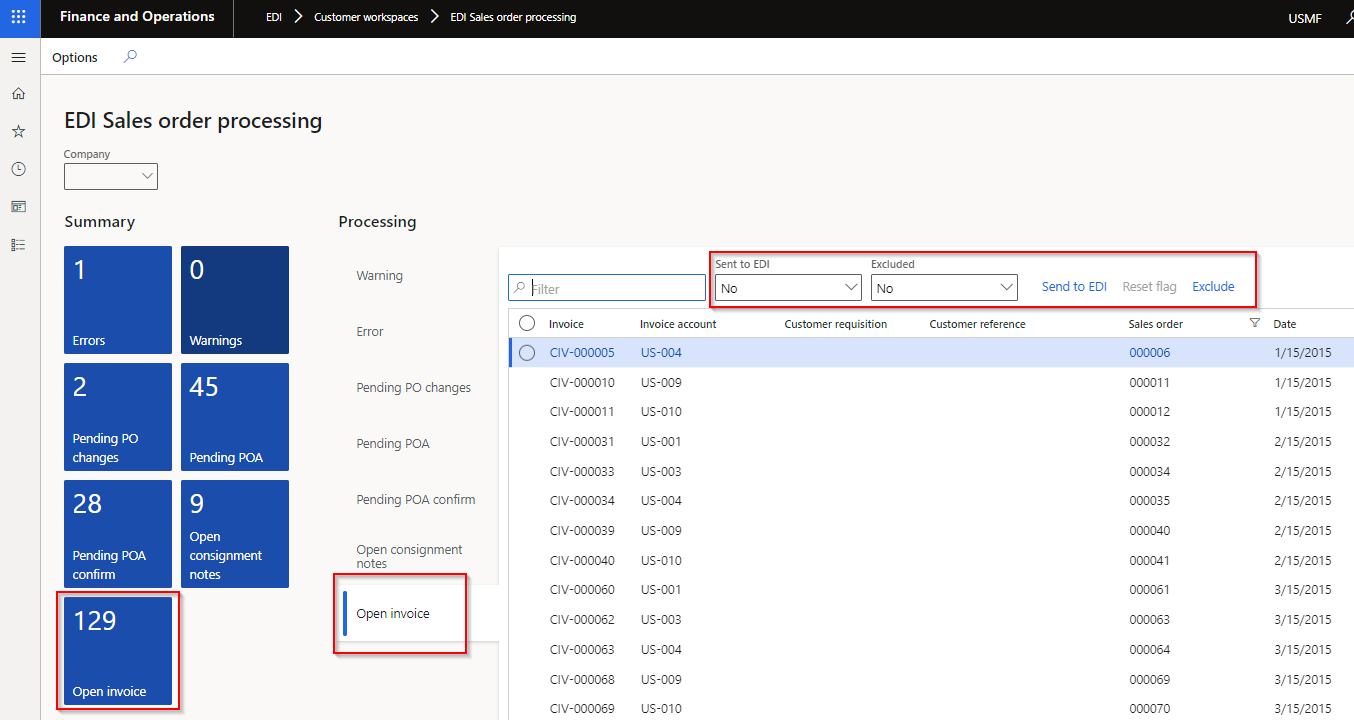
EDI Sales order processing workspace
New tile and tab for Open invoice. Filtered to sales invoices for customer trading partners with ‘Sales invoice’ document enabled. Below new buttons and filters also added to Open consignment notes
EDI Purchase order processing workspace
New tile and tab for Open confirmation. Filtered to purchase confirmations for vendor trading partners with Vendor purchase order document enabled.
All above processing workspaces
Additional functionality on Processing for all the Open tabs:
• Filtered to Sent to EDI is No
• Filtered to Excluded set to No
• Buttons:
o Send to EDI - can create staging record from workspace and update Sent to EDI to Yes
o Reset flag – Enabled when Sent to EDI is Yes. Reset ‘Sent to EDI’ to No which enables ‘Send to EDI’ button
o Exclude / Include (New functionality) – Ability to exclude the record from the “outstanding” list. Use filter Excluded to view records that has been excluded and can use button Include to include record again. Doesn’t create the staging record, but assist users in managing their “outstanding” list.
 |
Bug fixes
| Number |
Name |
Description |
| 9990 |
10.0.26 PEAP |
Compile error fixes for 10.0.26 PEAP |
| 10023 |
Customer advanced shipping notice |
SSCC blank for ‘ASN line configuration’ PickingList |
| 9707 |
3PL Document maintenance |
Tile vs. Document list (all legal entities) |
| 9644 |
Batch jobs |
‘Process to outbound’ ran for all legal entities |
| 9795 |
Purchase invoice |
Using OrderedQty instead of InvoiceQuantity |
| 9694 |
Saved views |
Saved views not applied to all EDI forms |
| 10080 |
Staging forms |
Staging forms wasn’t opening correct record after inserting a column on lines |
| 9820 |
XSLT format |
‘Format outbound document’ not applied to XSLT |
| 5402 |
Display method |
Ability to add display method field (example numberOf Lines) to text template mapping and ability to import via entity |
| 8341 |
3PL UI fixes |
Various small user interface fixes on staging forms (removing duplicates etc.) Also updated entity ‘EDI Shipment Receipt settings – Transfer order’ to ‘EDI Settings Shipment Receipt - Transfer order’ for consistency |
| 4432 |
Customer UI fixes |
Various small user interface fixes to staging forms, POA document setting profile and adding Store code to Trading partner’s Address |
Build 10.0.22.2022041013
Includes Inbound Transportation management (ITM) & ITM version Freight forwarder of 2022041012
Build 10.0.22.2022041014
| Number |
Name |
Description |
| 10236 |
Text document type template |
Field position index reverted to not unique |
Build 10.0.22.2022041015
Includes Inbound Transportation management (ITM) & ITM version Freight forwarder of 2022041014
