10.0.40.20250221
This document describes the features that are either new or changed in the release version 10.0.40.20250221.
Installation process
Version compatibility
The matrix shows the minimum DXC build versions compatible per Microsoft versions and builds.
If blank: investigations are ongoing.
| D365 Version |
Any issues found in testing? |
Product version tested |
Product version: 10.0.40
App build: 10.0.1935.92 |
• No functional issues
• Build error fixed in 17978 |
• Functional: 10.0.37.202405023
• Build error fixed in: 10.0.37.202405302 |
Product version: 10.0.41
App build: 10.0.2015.16 |
No |
10.0.37.202405302 |
Product version: 10.0.42
App build: 10.0.2095.13 |
No |
10.0.40.202409051 |
Product version: 10.0.43
App build: 10.0.2177.18 |
No |
10.0.40.2024120421 |
Release notes for other models included in product:
Microsoft deprecation notice
Microsoft notice
- Likely to affect: Companies that uses Database credential type for their Azure blob connections. Key Vault credential type is not affected. These connections can be found at ‘EDI > Setup > Connection setup > Azure sites’
- Status: Rollout for the change by Microsoft begins in October 2024 in a phased manner. Changes will be backported to 10.0.41 (PU65) and all later releases.
- What do you need to do if affected:
- Step 1 - Create Connection string in Azure portal
- Step 2 - In Key vault parameters create a Secret using the value created in step 1.
- Step 3 - Change all applicable Azure blob connections:
• Credential type: Key Vault
• Key vault: Secret setup in step 2
Current version
Release 10.0.40.20250221
DXC EDI 10.0.40 runs on the following Microsoft releases
Build 10.0.40.202502211
Release date: 21 February 2025
New features
Core module - Applies to all modules
| Number |
Name |
Description |
| 21113 |
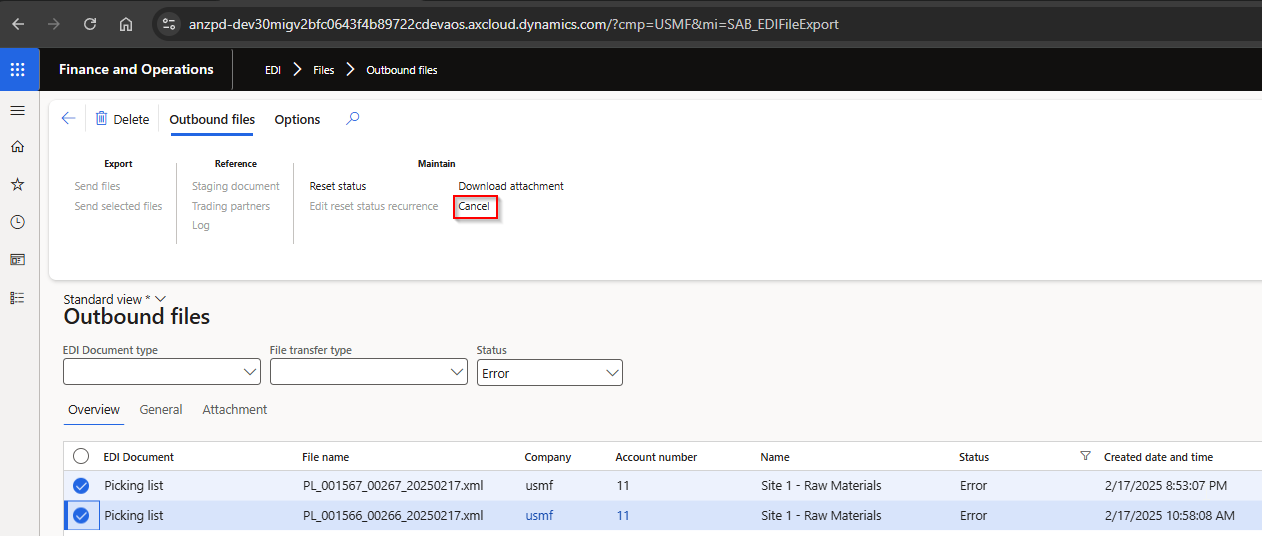
Outbound files - Cancel |
Ability to use Cancel to change selected Outbound file’s Status to Canceled.
The following statuses are excluded from cancel:
• Processed
• Processing
• Archived
 |
Customer module
| Number |
Name |
Description |
| 21449 |
Sales invoice |
Two extra header fields added:
• Line discount
• Total discount |
Bug fixes
Standard formats module
| Number |
Name |
Description |
| 18798 |
X12 templates - Copy |
Copy functionality didn’t copy all mappings for X12 templates |
Customer module
| Number |
Name |
Description |
| 21332 |
Customer advanced shipping notice |
Auto assign consignment note number - Not populated where the lines were from different locations. |
Vendor module
| Number |
Name |
Description |
| 20857 |
Vendor purchase order change |
Additional fix to 19584, which didn’t cover small rounding scenarios. |
Archive
Older releases notes can be accessed here
Installation process
To align with MS best practice and to protect our IP the following applies to the release process.
- The license models DXCLicense and Sable37License will only be released as binaries as part of a deployable package.
- We will not provide test models for the products, neither as binary or source code.
- We will only publish the release as a deployable package.
- Model source code can be provided at our discretion. It can be requested for debugging upgrade errors, or if required for extensions.
- If you have been given the source code to our model for extension or debugging purpose, never make modifications directly to our models!
- If you need an extension point, please send an email to ECLANZProductSupport@dxc.com and request it to be implemented.
Depending on the installation history follow one of these guides to install the new release.
Installation without existing installed product
- Apply the deployable package to your environment.
- If you have requested any model for extension or debugging purposes. Install the model source code.
a. Note, once the model source code is compiled it will overwrite the binaries installed when the deployable package was applied.
Installation with existing installed product
If you’re installing the new release in an installation that already has a previous version of the product installed and you’re not using it for debugging or extension. We recommend that you;
- Remove the release product model source code from your source control, if source control is used.
- Apply the deployable package, installing the latest version of the product models as binaries.
- Check in the binaries for the models to source control, if source control is used.
If you’re using our model source code for extension or debugging and would like to continue using it, please do the following to apply the new release with the source code.
- Remove product license model from your source control that is applicable to the release. You’ll find the license model in the deployable package. It will either be called DXCLicense and Sable37License.
- Apply the deployable package to your environment to install the latest binaries. Check in the binaries for the license model that was removed in step 1 to source control. Note, this step will also install the binaries for all the models in the new release.
- Install the product release model source code and check into source control.
If you don’t follow these instructions and continue building your installation deployable package using the license model source code, the installation will continue using the same license model as before applying the release.
Feature management
Enable all licensed modules via Feature management. Features are called:
- EDI (enable first)
- EDI – 3PL Documents
- EDI – Customer documents
- EDI – Vendor documents
- EDI – Freight forwarder landed cost documents
- EDI – Standard formats
If above features are not visible, press Check for updates to refresh the feature management list.
Refresh EDI module
EDI > Setup > EDI parameters
After each deployment, click Refresh module.
This will flush EDI caches and refresh EDI module metadata such as EDI document types, XML structures, field names etc.
