10.0.40.20241204
This document describes the features that are either new or changed in the release version 10.0.40.20241204.
Release 10.0.40.20241204
Build 10.0.40.2024120421
Release date: 6 December 2024
Bug fixes
Freight forwarder landed cost module
| Number |
Name |
Description |
| 20623 |
Voyage creator |
Voyage creator failed when running in batch mode and set to auto create backorder voyage advice.
Error: “Stack trace: Cannot run form on non interactive session. EDI % Voyage creator Purchase order % line number % cannot be split because of following errors. You may need add the entire quantity of the order line to the voyage.”
Issue only applicable to 10.0.40.202412041 |
Build 10.0.40.202412041
Release date: 4 December 2024
New features
Core module - Applies to all modules
| Number |
Name |
Description |
| 19356 |
Azure connection - SAS |
Support Azure blob site using SAS account level key vault. |
| 17514 |
DXC License manager |
New DXC License manager 10.0.40.202412041. See Release notes for more detail. |
| 20389 |
DXC Connections |
New DXC Connections 10.0.40.202412041. Affects Azure connections.
See Release notes for more detail. |
Customer module
| Number |
Name |
Description |
| 18847 |
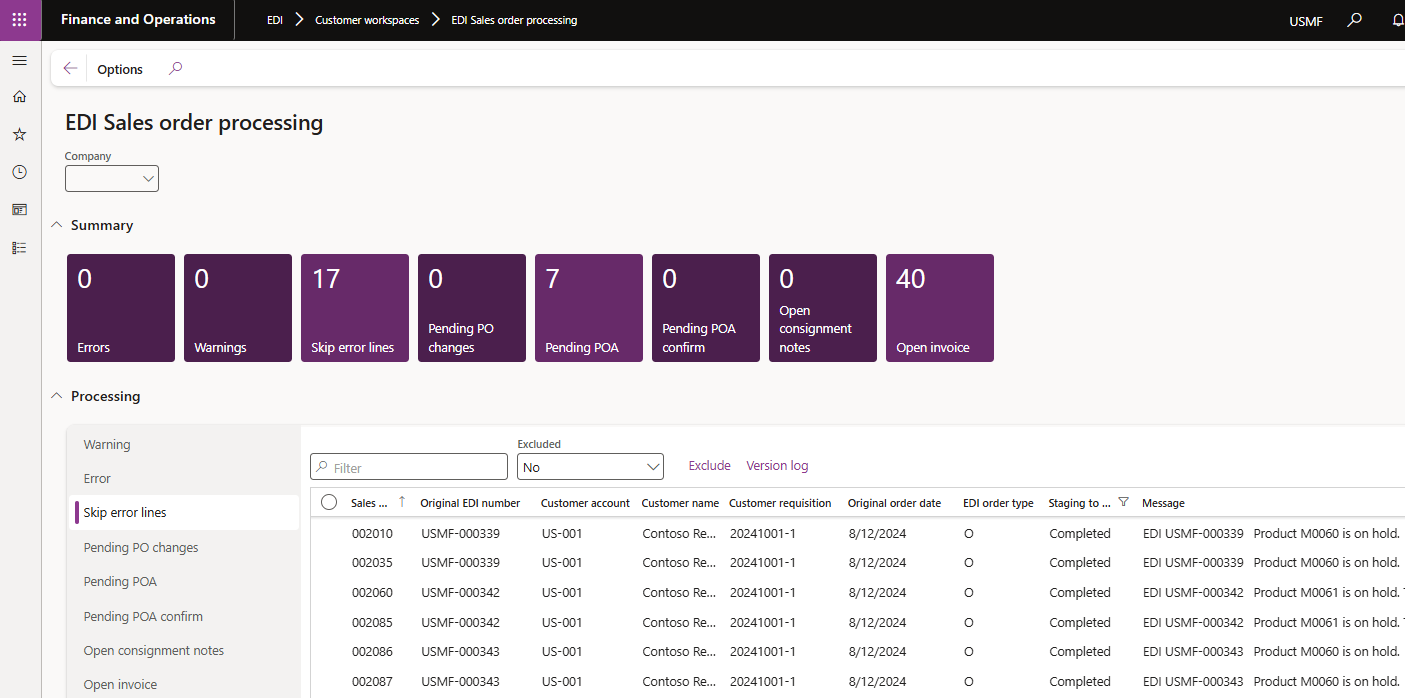
EDI Sales order processing workspaces - Skip error lines |
New tile and list Skip error lines added for Customer purchase order records that completed succesfully but contains skipped lines where the ‘Skip error lines’ document setting is used.
 |
| 18821 |
Customer purchase order - Skip error lines |
‘The final sell date for item % has passed’ now included in supported skip error lines scenarios. If skip error lines is set to No on the document setting, the staging record will error if the sell date has passed. |
| 19950 |
Customer purchase order - Default product variant |
Where the product variant isn’t provided by Staging, GTIN, Barcode or External item number, the default product variant will default to the sales order line. |
| 19964 |
Unified pricing management |
Ability to process Customer purchase order record with Unified pricing management enabled. |
| 20158 |
Customer purchase order acknowledgement |
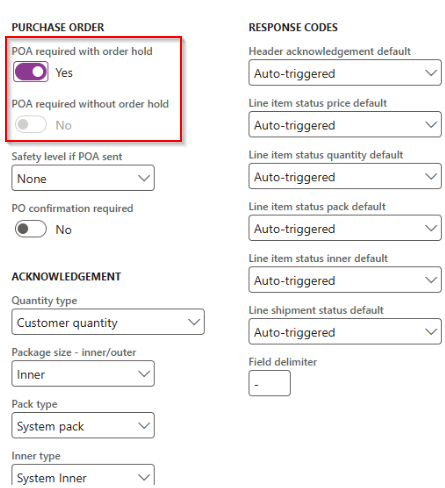
More options for POA required:
• POA required with order hold - Sales order POA status set to Pending and Sales order put on hold (no change to processing, only relabeled to ‘Lock order’)
• POA required without order hold - Sales order POA status set to Pending (new option)
The new option sets the POA status to Pending, thus the sales order is considered in the periodic task ‘Send customer purchase order acknowledgement’ without putting the sales order on hold.
 |
Freight forwarder landed cost module
| Number |
Name |
Description |
| 19178 |
Voyage advice |
Ability to automatically trigger a new Voyage advice record for remaining purchase order lines after processing inbound Voyage creator when:
• Trading partner’s Auto send backorder voyage advice set to Yes
• Trading partner has Voyage advice document enabled
• Vendor’s No landed cost backorder set to No
• Purchase order line’s Deliver remainder > 0
• Purchase order line’s Voyage is blank |
| 19455 |
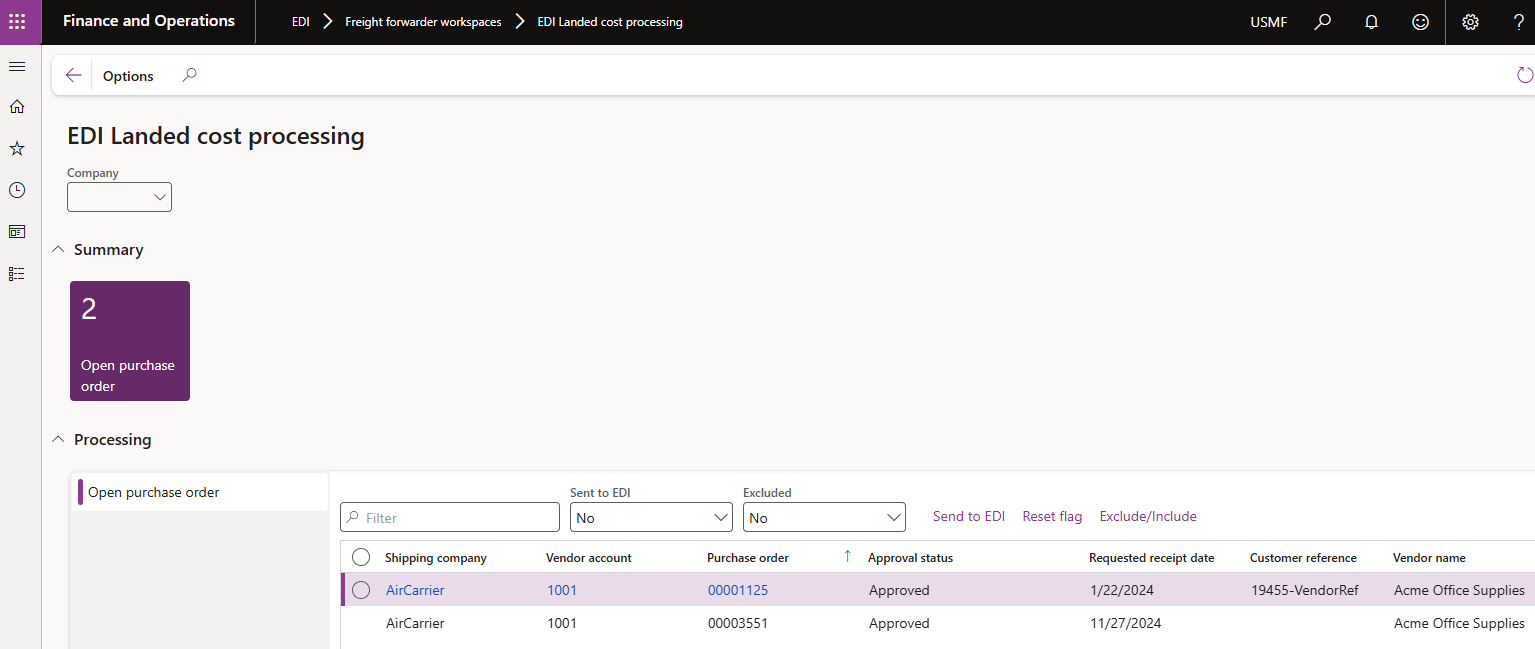
Workspace |
New workspace EDI Landed cost processing. Ability to view purchase orders that that should still be sent as Voyage advice.
For example the Purchase order has been created, but not yet confirmed (which includes an auto Voyage advice).
User guide
 |
Bug fixes
Core module - Applies to all modules
| Number |
Name |
Description |
| 18960 |
Data entity ‘EDI Azure container setup’ |
Missing field ‘Folder name’ |
Customer module
| Number |
Name |
Description |
| 18814 |
Customer purchase order - Skip error lines |
Also now includes stopped for sales orders for a specific site not on Rank 0. |
| 19389 |
Trading partner |
Fix to label ‘Enable store code identification’. |
| 19316 |
Sales order - EDI history |
Not all staging records displayed on EDI history - where same sales id used in multiple legal entities. This fix only works for new records. |
| 19766 |
Customer purchase order - Version log |
Added ‘Product is on hold’ to Version log. |
Vendor module
| Number |
Name |
Description |
| 19159 |
Vendor purchase order acknowledgement - Unit conversion |
When vendor has UOM mapping assigned that has the D365 unit mapped to a different D365 unit. Error when processing document: “Unit conversion from % to % does not exist”. Changed: Where the units are the same, it will now skip the logic to find unit conversion. |
| 19584 |
Vendor purchase order change |
Only applicable to where the line’s price unit was not 1. Incorrect ‘Line change type’ of ‘Price change’ where the price hasn’t been changed. |
| 20117 |
Vendor purchase order change |
Fix to cancelled purchase order line’s ‘Line change type’ which were incorrectly ‘Quantity decrease’ instead of ‘Delete items’. |
