10.0.34.20230731
This document describes the features that are either new or changed in the release version 10.0.34.20230731.
Release 10.0.34.20230731
Build 10.0.34.202307313
Release date: 18 October 2023
Bug fixes
Customer module
| Number |
Name |
Description |
| 16289 |
Customer advanced shipping notice |
Updates to Intercompany ASN as there were still settings used from intercompany trading partner (shipping company) instead of customer the ASN will be sent to (originating EDI customer). The intercompany ASN now doesn’t require the shipping company setup as customer trading partner. |
| 16134 |
Customer advanced shipping notice |
Only applies to ‘Auto assign consignment note number’ document type set to Yes:
• Use sales order header’s delivery address when creating/assigning consolidated packing slip
Only applies to ‘Auto assign consignment note number’ document type set to Yes and ‘ASN strategy set to Consolidated packing slips:
• If a packing slip should be sent to EDI, for example ‘Send only for EDI orders’ is Yes and the order is EDI, but an existing open Consolidated packing slip exists for a packing slip(s) that shouldn’t be sent to EDI (for example order isn’t EDI), the packing slip will not be added to the consignment that can’t be sent to EDI. |
Build 10.0.34.202307312
Release date: 28 September 2023
Bug fixes
Core module - Applies to all modules
| Number |
Name |
Description |
| 15887 |
Connection types - SFTP |
The underlying connection was closed: The server committed a protocol violation.
Issue only for release 10.0.34.202307311 that prevented file moved to archive/error folders. |
Customer module
| Number |
Name |
Description |
| 16094 |
Customer advanced shipping notice |
Intercompany order not identified as EDI order for sending ASN. Use ‘Send only for EDI orders’ from originating company for intercompany orders. |
Build 10.0.34.202307311
Release date: 31 July 2023
New features
Core module - Applies to all modules
| Number |
Name |
Description |
| 14455 |
Connection types - Azure, FTP and SFTP |
New option Disable delete. When set to Yes, the file will not be deleted from the import path. This is useful where company doesn’t have edit rights on the connection and don’t want to see an error in the connection log.
FTP: Enabling this option may cause a performance impact. Each file will be downloaded and uploaded to its specific directory to retain file in source directory. |
| N/A |
Licensing |
New versions included:
• DXC License 10.0.34.202307311
• DXC License Manager 10.0.32.202307312 |
Customer module
| Number |
Name |
Description |
14184
15009 |
Customer advanced shipping notice |
Support Intercompany Customer ASN. Creates the ASN against the originating EDI order’s Trading partner and applies their ASN document setting, for example only create for EDI order.
The intercompany ASN’s External item number will be obtained from the originating sales order line - only applies to EDI orders. |
| 14569 |
Customer advanced shipping notice |
New document setting Auto assign consignment note number and EDI parameter’s Number sequence Consignment note number. Ability to auto generate consignment numbers for Single and Consolidated packing slips. Where Shipping carrier is set to auto generate consignment numbers, the pro number sequence will still be used. This new document setting option applies to sales orders where no shipping carrier is assigned, or the shipping carrier doesn’t auto generate consignment notes.
Where the document setting’s ASN strategy is set to Consolidated packing slips and Auto assign consignment note number is set to Yes, the packing slip will automatically be assigned to latest open (not sent to EDI) consignment that matches the packing slip (for example shipping carrier, customer, address). If an open consignment note is not found, a new consignment note will be created and the packing slip assigned.
Users can still manually create and assign consignment note numbers as well.
User guide |
| 14964 |
Customer advanced shipping notice |
New periodic task called Send customer advanced shipping notice.
Ability to set a recurrence for automatically sending open (Sent to EDI is set to No) consignment note numbers to EDI which sets the Consignment note’s Sent to EDI to Yes and creates the ASN record.
This is useful for consolidated packing slips that can be automatically “closed” and ASN created after a certain time in the day.
User guide |
3PL module
| Number |
Functionality |
Reason |
| 14343 |
Product master |
Ability to filter to multiple Lifecycle states on the Product configuration update periodic task.
This periodic task’s purpose is to flag the product as applicable to the 3PL warehouse if inventory transactions exist. |
Bug fixes
Core module - Applies to all modules
| Number |
Name |
Description |
| 11657 |
Saved views |
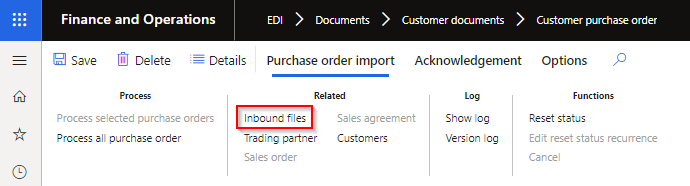
Applicable when feature ‘Saved views performance enhancement’ is enabled, and user navigates from a staging form to Inbound files using the Inbound files button.
Inbound file’s Default view is applied and could result in applicable inbound file not displaying.
When setting new EDI parameters field Apply standard view to:
• Yes: the standard view will be applied
• No: the default view will be applied
 |
| 14821 |
Connection types - Azure and FTP |
File delete was attempted after file has been moved to error folder. Functionally worked, but log indicated an error for attempted delete. FTP filename will get a date/time stamp suffix when moved to archive and error paths. |
| 14437 |
Connection types - Azure, FTP and SFTP |
When Archive path / container is not setup the intention is not to archive the import file, example where company doesn’t have edit rights on the connection.
The connection log should not give a warning that it failed to archive in this case. |
| 15269 |
Data entity - EDI Outbound file names |
Import failed with: Field ‘EDI Document type’ must be filled in |
Customer module
| Number |
Name |
Description |
| 13069 |
Data entity |
Entity POA response code group lines didn’t allow importing values where Allow auto trigger is set to No. |
| 14648 |
Customer advanced shipping notice |
The Shipped quantity (field Quantity / OrderQty) was in Inventory unit, now changed to match the Sales unit for the ASN line. Field InventQty is still in the Inventory unit. |
| 12619 |
Customer advanced shipping notice |
Update label for InventQuantity to Inventory quantity and added to the staging form. |
| 15192 |
Customer purchase order acknowledgement |
Fix to mapped values for staging line field POA code item. Extra character added to lines after line 1. |
